Beyond the Notes: Rhythm, Dynamics, and the Limits of Code
Share
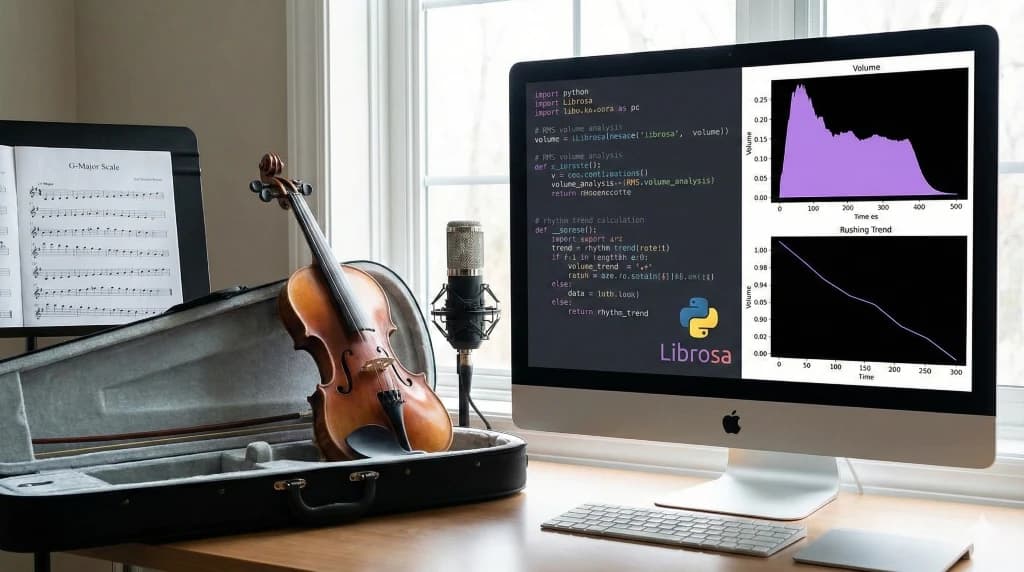
In Part 2, we successfully built a Python application that acts as a digital music teacher. It listens to my daughter’s violin practice, aligns it with a professional recording, and spits out a graph showing exactly where she went sharp or flat.
It was a triumph. The code worked, the graphs were pretty, and we had data. But as any musician knows, playing the right note is only half the battle. If you play the correct pitch at the wrong time, or with a scratchy tone, it’s still not music.
In this final chapter, I want to explore the limitations of our current approach—where the code fails—and sketch out the roadmap for how we can expand this tool to analyse the soul of the performance: rhythm, dynamics, and tone.
The Reality Check: Where Our Code Stumbles
As we tested the tool with more complex pieces, we ran into some "gotchas." It’s important to be honest about these limitations because they define the boundary between a fun hobby project and a commercial product.
-
The "Double Stop" Problem
Our current method uses a pitch tracking algorithm calledpyin, which is monophonic. It expects one clear note at a time. The moment my daughter plays a "double stop" (two strings at once) or a chord, the algorithm gets confused and often returns a pitch somewhere in the middle—or garbage data.- The Fix: We would need to move to multipitch estimation algorithms, which are significantly more complex and computationally heavy.
-
The Silence Trap
As we discovered during development (and fixed with some cleverNaNmasking!), computers hate silence. Background noise, a creaking chair, or the intake of breath before a phrase can be misinterpreted as "notes."- The Lesson: Audio cleanliness is paramount. We learned that "garbage in, garbage out" applies doubly to audio processing.
-
The "Reference" Bias
Our tool compares the student to a reference recording. But who says the reference is "perfect"? If the professional player uses a lot of rubato (expressive slowing down), and my daughter plays it strictly in time, the code will tell her she's "wrong."- The Nuance: We are grading similarity, not strictly musicality. A better version of this tool might compare her playing to a rigid metronome grid for rhythm, but keep the reference for pitch.
Expanding the Horizon: Analysing Rhythm & Timing
Pitch is “what” you play. Rhythm is “when” you play it.
We already used librosa.onset.onset_detect to split the audio into notes. We
can take this further to measure rhythmic stability. Instead of just
counting notes, we can measure the time gap between them.
Rhythm Analysis Rushing vs Dragging
The Concept: If a student is playing a steady scale, the time between note onsets (Inter-Onset Interval, or IOI) should be consistent.
# --- RHYTHM ANALYSIS: Rushing vs. Dragging ---

# 1. Calculate the time gaps (Inter-Onset Intervals) between notes
# If onsets are [1.0, 2.0, 2.9], the IOIs are [1.0, 0.9]
ioi_student = np.diff(onsets_student_times)

# Create an index for the notes (Note 1, Note 2, etc.) for the x-axis
note_indices = np.arange(len(ioi_student)) + 1

# 2. Calculate the Trend (Linear Regression)
# We fit a straight line to the data to see if the values are generally going up or down.
# np.polyfit(x, y, 1) returns the slope and intercept.
slope, intercept = np.polyfit(note_indices, ioi_student, 1)

# Generate the points for the trend line
trend_line = slope * note_indices + intercept

# 3. Plotting the Analysis
plt.figure(figsize=(12, 6))

# Plot the actual time gaps for each note
plt.plot(note_indices, ioi_student, marker='o', linestyle='-', color='purple', linewidth=2, label='Time Between Notes')

# Plot the calculated trend line
plt.plot(note_indices, trend_line, linestyle='--', color='gray', alpha=0.7, label='Overall Trend')

# Add titles and labels
plt.title('Rhythm Consistency Analysis', fontsize=16)
plt.xlabel('Note Sequence', fontsize=12)
plt.ylabel('Duration (Seconds)', fontsize=12)

# 4. Add Dynamic Interpretation Text
# A significant negative slope means intervals are getting smaller (speeding up)
# A significant positive slope means intervals are getting larger (slowing down)
threshold = 0.005

if slope < -threshold:
    status = "Result: RUSHING (Speeding Up)"
    box_color = 'red'
elif slope > threshold:
    status = "Result: DRAGGING (Slowing Down)"
    box_color = 'blue'
else:
    status = "Result: STEADY TEMPO"
    box_color = 'green'

# Display the status in a text box on the plot
plt.text(0.02, 0.95, status, transform=plt.gca().transAxes, fontsize=14,
         verticalalignment='top', bbox=dict(boxstyle='round', facecolor=box_color, alpha=0.2))

plt.legend()
plt.grid(True, linestyle=':')
plt.show()
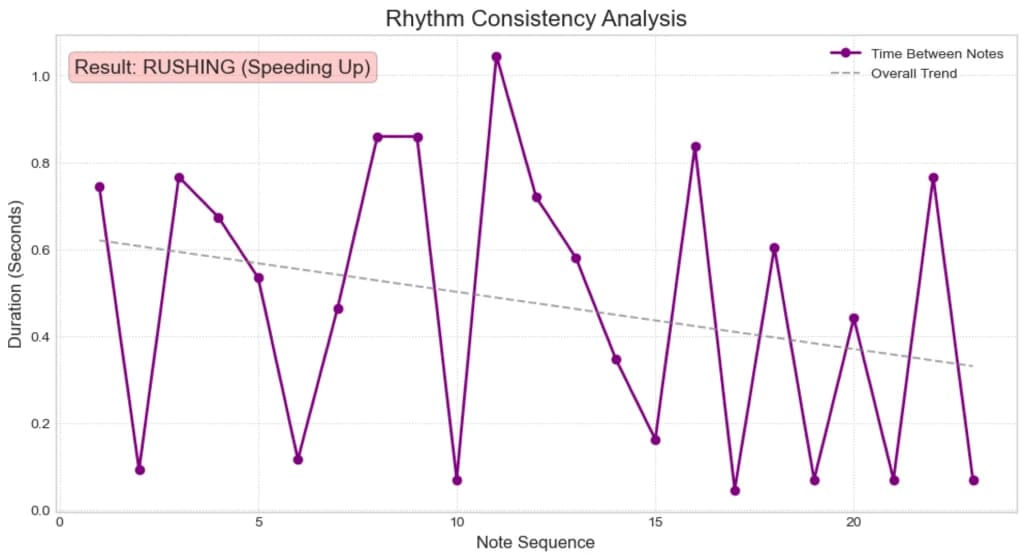
What This Graph Tells You
- The Purple Line (Actual): Shows the "heartbeat" of the performance. If it's jagged, the rhythm is uneven.
- The Dashed Line (Trend): This is the key.
- Slope Down: The gaps between notes are getting shorter. She is speeding up (rushing) as she goes up the scale.
- Slope Up: The gaps are getting longer. She is slowing down (dragging).
- Flat: She is keeping a perfectly steady tempo.
The Soul of Music: Dynamics and Expression
A robot plays notes at the exact same volume. A human breathes life into them with dynamics—getting louder (crescendo) and softer (diminuendo).
To analyse this, we need to look at the amplitude (loudness) of the signal, not the frequency. In Python, we calculate the RMS (Root Mean Square) energy.
The Concept: We can extract the "volume envelope" of her performance and overlay it with the professional's. Does her volume swell at the top of the phrase like the pro's does?
# --- DYNAMICS ANALYSIS: Comparing Phrasing ---

# 1. Compute the RMS (Root Mean Square) energy for both files
# This gives us the "loudness" of the audio over time
rms_ref = librosa.feature.rms(y=y_ref)[0]
rms_student = librosa.feature.rms(y=y_student)[0]

# 2. Normalize the Data (Min-Max Scaling)
# We scale both curves to be between 0 and 1 so we can compare the *shape* # of the dynamics, regardless of recording volume.
def normalize(x):
    return (x - np.min(x)) / (np.max(x) - np.min(x))

rms_ref_norm = normalize(rms_ref)
rms_student_norm = normalize(rms_student)

# 3. Create Time Axes for Plotting
# We need time axes that match the RMS frames
times_ref_rms = librosa.times_like(rms_ref, sr=sr_ref)
times_student_rms = librosa.times_like(rms_student, sr=sr_student)

# 4. Plotting the Comparison
plt.figure(figsize=(15, 6))

# Plot Reference Dynamics (Filled Area)
plt.fill_between(times_ref_rms, rms_ref_norm, color='gray', alpha=0.3, label='Reference Dynamics (Target)')
plt.plot(times_ref_rms, rms_ref_norm, color='black', alpha=0.5, linewidth=1)

# Plot Student Dynamics (Line)
plt.plot(times_student_rms, rms_student_norm, color='purple', linewidth=2.5, label='Student Dynamics')

plt.title('Dynamics Comparison: Volume Envelope', fontsize=16)
plt.xlabel('Time (s)', fontsize=12)
plt.ylabel('Relative Loudness (Normalized)', fontsize=12)
plt.legend(loc='upper right')
plt.grid(True, linestyle=':')

# Show the plot
plt.show()
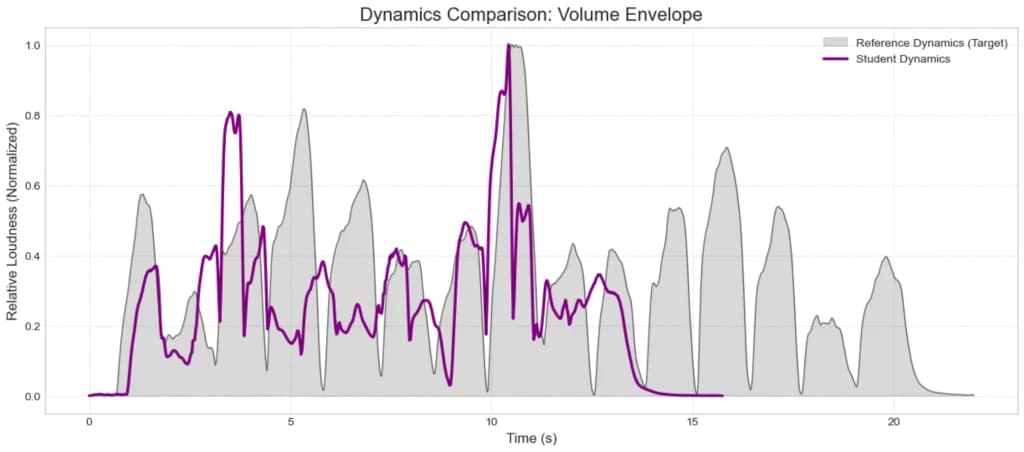
This would allow me to say, "See here? You stayed quiet, but the professional got really loud for the climax of the scale."
How to Read This Graph
- Gray Shaded Area: This represents the professional's dynamic "shape." You might see it swell in the middle of the scale (a crescendo) and taper off at the end (diminuendo).
- Purple Line: This is your daughter's playing.
- What to look for:
- Flatness: If the purple line is flat while the gray area curves up and down, she is playing "robotically" without expression.
- Peaks: Do her loudest moments match the professional's loudest moments?
- Decay: Does she hold the volume of the last note, or does it cut off abruptly compared to the reference?
Conclusion: The Journey from PlayStation to Python
When I started this project, I just wanted to tell if a G-Major scale was in tune. I ended up with something much more valuable.
I rediscovered the joy of "making it up and having fun," just like that percussion class in primary school. I dusted off my coding skills and found a practical, meaningful application for them. But most importantly, I found a new way to connect with my daughter.
We sit at the computer now, not just as father and daughter, but as a team—the musician and the engineer—debugging scales and analysing soundwaves. I still can't hear the difference between a slightly flat note and a perfect one, but now, I can point to a graph and say, "Let's try that A-string again, the data says we can do better."
And really, that’s better than any high score I ever got on the PlayStation.
What's Coming Next: From Research to Reality
We now have a powerful set of Python scripts. We can detect pitch accuracy, analyse rhythm stability, and compare dynamic expression. The math is solid, and the insights are valuable.
But right now, this logic is trapped inside a Jupyter Notebook. It’s a research experiment, not a tool. To make this useful, we need to turn our "script" into a "service"—something that can accept an audio file from anywhere and return an instant analysis.
In Part 4, we will focus on Backend Engineering. We will:
- Refactor our Code: Move from messy notebook cells to clean, reusable Python functions.
- Build an API: Use FastAPI to create a high-performance web server.
- Test the System: Learn how to verify our analysis engine using Swagger UI, without needing to write a single line of frontend code.
We are building the "brain" of the operation, preparing it to power whatever interface we choose to build next.
References & Further Reading
A Tutorial on Onset Detection in Music Signals
Bello, J. P., et al. (2005).
We used
librosa.onset.onset_detectto find the start of every note. This paper is the definitive guide to how computers figure out exactly when a note begins, distinguishing a soft violin bow stroke from a percussive drum hit.Computational Models of Expressive Music Performance: The State of the Art
Widmer, G., & Goebl, W. (2004).
In Part 3, we tried to analyze "expression" (dynamics and rubato). This paper explores the fascinating science of quantifying musical emotion—exactly what we attempted with our volume envelopes and trend lines.
Deep Salience Representations for F0 Estimation in Polyphonic Music
Bittner, R. M., et al. (2017).
I mentioned the "Double Stop Problem"—that our current tool fails when two notes are played at once. This paper introduces modern "multipitch" algorithms (like those used in Spotify's basic analysis) that solve this limitation.
Fundamentals of Music Processing: Audio, Analysis, Algorithms, Applications
Müller, M. (2015).
This is widely considered the "bible" of Music Information Retrieval (MIR). If you want to understand the math behind DTW, chromagrams, and tempo tracking in much greater detail, this is the book to read.