From Soundwaves to Feedback — A Python Deep Dive
Share
In Part 1, I shared my motivation: to use my software engineering skills to help my daughter with her violin practice. The goal wasn't just to build something cool; it was to create a tool that could give me the "ears" of a professional music teacher, offering specific, actionable feedback.
Now, it's time to roll up our sleeves and dive into the code. This is where the magic happens. We'll walk through the exact steps I took to turn a simple audio recording into a detailed performance analysis. We’ll be using Python, and the journey will take us through loading audio, extracting musical features, and finally, creating a visual report card of my daughter's G Major scale.
Don't worry if terms like "pitch contour" or "chromagram" sound intimidating. I'll break everything down step-by-step. Let's get started.
The Plan of Attack
Our project follows a clear, logical path from raw audio to final feedback. Here's the roadmap:
- Load Audio:: We’ll start by loading two audio files into our Python environment: a "perfect" reference recording of a G Major scale and a recording of my daughter playing the same scale.
- Extract Features: From the soundwaves, we'll extract the core musical information: the pitch (which note is being played) and the onsets (the start time of each note).
- Alignment: My daughter doesn't play at the exact same tempo as the reference recording (and that's okay!). We'll use a powerful algorithm called Dynamic Time Warping (DTW) to intelligently line up the two performances.
- Analysis & Comparison: Once aligned, we can directly compare her pitch against the target pitch for every single note.
- Visualisation: Finally, we’ll create an intuitive graph that shows exactly which notes were sharp, flat, or perfectly in tune.
Step 1: Setting Up Our Digital Music Stand
Before we can do anything, we need to import the right tools. Our primary tool
is librosa, an incredible Python library for music and audio analysis. We'll
also use numpy for numerical operations and matplotlib for plotting our
results.
# Import the necessary libraries
import librosa
import librosa.display
import numpy as np
import matplotlib.pyplot as plt
from IPython.display import Audio

# Set some display defaults for cleaner plots
# https://matplotlib.org/stable/users/explain/customizing.html
# This line sets the visual style for all subsequent plots
plt.style.use('seaborn-v0_8-whitegrid')

# This line sets the default size for all figures (plots) created using Matplotlib
plt.rcParams['figure.figsize'] = (15, 7)
Step 2: Loading the Performances
Next, we load our two .wav files. For this project, I used:
reference_scale.wav: A clean recording of the G Major scale.student_scale.wav: My daughter's performance.
The code loads the audio as a numerical array and gets the "sample rate," which is essentially the audio's resolution.
try:
  # Load the reference audio file
  y_ref, sr_ref = librosa.load('reference_scale.wav')

  # This line lets you play the reference audio directly in the notebook
  display(Audio(data=y_ref, rate=sr_ref))

  # Load the student's audio file
  y_student, sr_student = librosa.load('student_scale.wav')

  # This line lets you play the student's audio directly in the notebook
  display(Audio(data=y_student, rate=sr_student))

  # For a fair comparison, we must ensure the sample rates are identical
  if sr_ref != sr_student:
    y_student = librosa.resample(y=y_student, orig_sr=sr_student, target_sr=sr_ref)
    sr_student = sr_ref

except FileNotFoundError:
  print("ERROR: Make sure your .wav files are in the same folder as the code.")
When you run y, sr = librosa.load('your_audio_file.wav'), here's what you get:
1. The Audio Time Series (y)
This is the actual audio data, loaded as a NumPy array.
Think of a sound wave. This array represents the amplitude (how loud the sound is at a given moment) at thousands of tiny, evenly spaced intervals in time.
-
Format: It's a floating-point array. By default,
librosaconverts the audio to a single channel (mono) and normalises the values so they range from -1.0 to 1.0. - What it represents: A positive value might represent the speaker cone moving forward, a negative value represents it moving backward, and zero represents no movement.
2. The Sample Rate (sr)
This is an integer that tells you how many data points (or "samples") from the audio were recorded per second.
- Unit: Hertz (Hz).
-
Default:
librosadefaults to a sample rate of 22,050 Hz. This means theyarray will have 22,050 samples for every second of audio. -
Why it's important: The sample rate is crucial because it gives the audio
time series its meaning. Without it, the
yarray is just a long list of numbers. With it, you know that the 22,050th value in the array corresponds to what the sound was doing at the 1-second mark.
Putting It Together
So, if you load a 3-second audio file, sr will be 22050, and the NumPy array
y will have approximately 3 * 22050 = 66,150 values in it. Together, y and
sr give you everything you need to digitally represent and analyse the sound.
The Audio Playback
The Audio function from IPython.display allows us to play audio directly in
the notebook.
Step 3: Seeing Sound – Extracting the Pitch Contour
How do we get from a soundwave to a musical note? We track its fundamental
frequency (F0), or pitch. The librosa.pyin function does this for us,
analysing the audio frame by frame and estimating the pitch in Hertz (Hz). The
result is a "pitch contour"—a line that shows the note being played at every
moment in time.
# Extract pitch from both audio files, specifying the violin's note range
f0_ref, _, _ = librosa.pyin(y_ref, fmin=librosa.note_to_hz('G3'), fmax=librosa.note_to_hz('G5'))
f0_student, _, _ = librosa.pyin(y_student, fmin=librosa.note_to_hz('G3'), fmax=librosa.note_to_hz('G5'))

# Replace silent sections (NaNs) with 0 for easier plotting
f0_ref[np.isnan(f0_ref)] = 0
f0_student[np.isnan(f0_student)] = 0

# Get the timestamps for our plots
times_ref = librosa.times_like(f0_ref)
times_student = librosa.times_like(f0_student)

# Let's visualise the raw pitch contours
fig, ax = plt.subplots(nrows=2, sharex=True, sharey=True)
ax[0].plot(times_ref, f0_ref, label='Reference F0', color='b')
ax[0].set_title('Reference Pitch Contour')
ax[0].set_ylabel('Frequency (Hz)')

ax[1].plot(times_student, f0_student, label='Student F0', color='r')
ax[1].set_title('Student Pitch Contour')
ax[1].set_xlabel('Time (s)')
ax[1].set_ylabel('Frequency (Hz)')

plt.show()
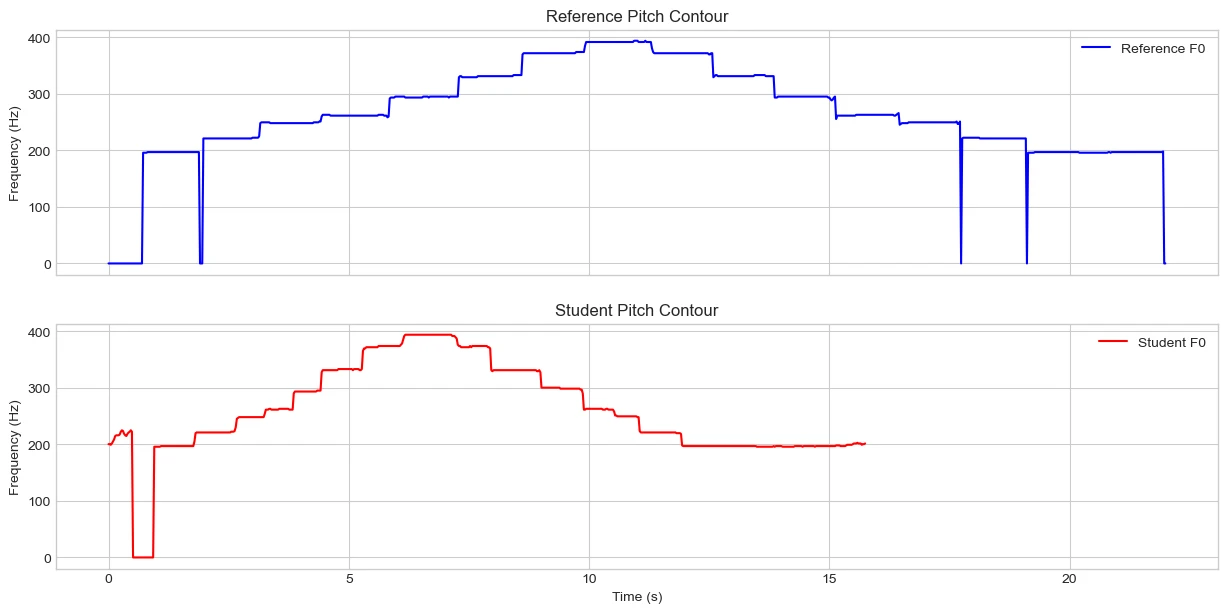
After running this, you immediately see the problem we need to solve. The red and blue plots look similar in shape, but they are stretched and shifted. We can't compare them directly because they aren't aligned in time.
Step 4: The Magic of Alignment – Dynamic Time Warping (DTW)
This is where the most powerful technique in our toolkit comes in: Dynamic Time Warping (DTW).
Imagine you have two pieces of elastic with the same sequence of dots drawn on them, but one has been stretched more than the other. DTW is a clever algorithm that finds the best way to squish and stretch one elastic to perfectly line up its dots with the other. It finds the optimal alignment between two time-dependent sequences, which is exactly what we need. We'll use a musical feature called a chromagram for this, as it's great at representing the notes being played regardless of small tuning errors.
# Compute chromagrams for alignment
chroma_ref = librosa.feature.chroma_cqt(y=y_ref, sr=sr_ref, hop_length=hop_length)
chroma_student = librosa.feature.chroma_cqt(y=y_student, sr=sr_student, hop_length=hop_length)

# Use DTW to find the optimal warping path
D, wp = librosa.sequence.dtw(X=chroma_ref, Y=chroma_student, metric='cosine')
The output, wp, is our "map" for lining up the student's performance with the reference.
Breakdown of the Code
-
librosa.feature.chroma_cqtcreates a chromagram from an audio signal. In simple terms, it breaks down the audio to show how strongly each of the 12 musical notes (C, C#, D, etc.) is present over time. librosa.sequence.dtwcomputes the DTW alignment between two sequences.-
X=chroma_ref, Y=chroma_student: These are the two chromagrams sequences we want to align. -
metric='cosine': This tells the algorithm how to measure the difference between any two moments in the recordings. The 'cosine' metric is good at comparing the shape of the musical content, making it effective even if one recording is louder than the other.
What It Returns
The function librosa.sequence.dtw returns two things:
-
D(Distance Matrix): This is a cost matrix that the algorithm generates internally to find the best warping path. It's essentially the "scratch paper" used to calculate the final result,wp. -
wp(Warping Path): This is the most important result. It's an array of coordinate pairs that acts as a "map" connecting the timeline of the student's recording to the timeline of the reference recording. For example, it might tell you that the 1.2-second mark in the student's audio corresponds to the 1.5-second mark in the reference audio.
Visualising the DTW Alignment
We can visualise the DTW path to see how the two performances align over time.
# The warping path 'wp' contains pairs of aligned frame indices
# It's often plotted to visualise the alignment
wp_s = np.asarray(wp) * librosa.get_duration(y=y_ref) / chroma_ref.shape[1]

fig, ax = plt.subplots()
img = librosa.display.specshow(D, x_axis='time', y_axis='time', cmap='gray_r', ax=ax)
ax.plot(wp_s[:, 1], wp_s[:, 0], marker='.', color='r', linestyle='-')
ax.set_title('DTW Path: Aligning Student to Reference')
ax.set_xlabel('Student Time (s)')
ax.set_ylabel('Reference Time (s)')
fig.colorbar(img, ax=ax)

plt.show()
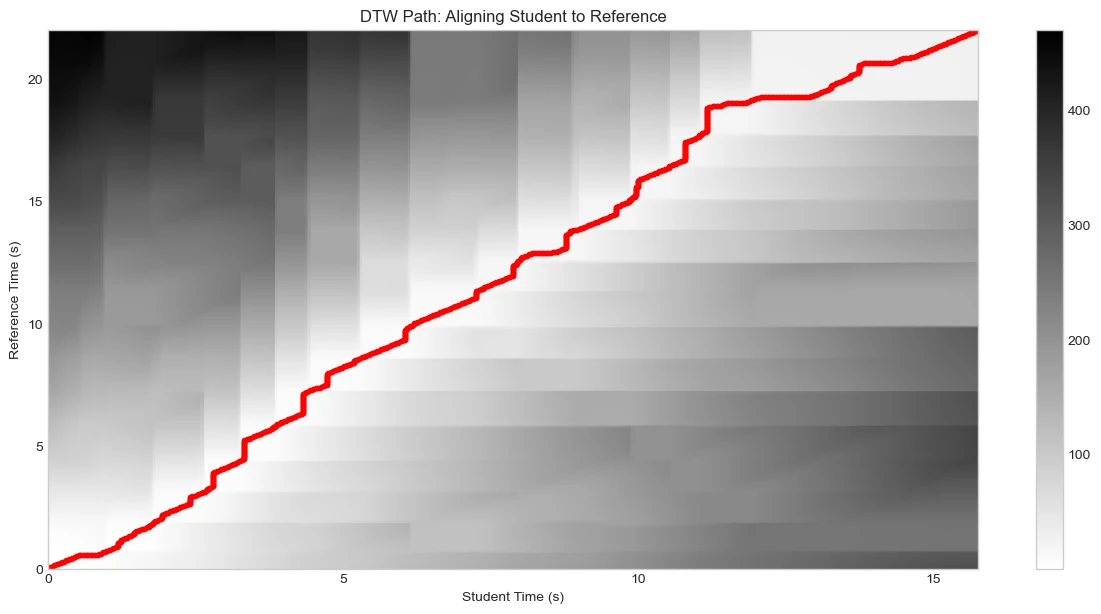
This code block creates a visual plot to show you exactly how the Dynamic Time Warping (DTW) algorithm has aligned the two audio files.
Step-by-Step Breakdown
-
wp_s = np.asarray(wp) * librosa.get_duration(y=y_ref) / chroma_ref.shape[1]This is the most important calculation. The raw warping path,wp, consists of frame numbers (e.g., "frame 5 of the student's audio aligns with frame 7 of the reference"). This isn't very intuitive.This line converts those frame numbers into seconds. It works by:
-
Getting the total duration of the reference audio in seconds using
librosa.get_duration(y=y_ref). -
Dividing it by the total number of frames in the chromagram
(
chroma_ref.shape[1]) to find out how long each frame is. -
Multiplying the frame numbers in
wpby this duration to get the corresponding time in seconds.
So,
wp_snow holds the alignment map in a human-readable format (seconds). -
Getting the total duration of the reference audio in seconds using
-
img = librosa.display.specshow(D, ...)This line creates the background of the plot. It visualises the cost matrixD, which was calculated by the DTW algorithm. You can think of this as a topographical map where darker areas represent "valleys" of high similarity between the two audio files, and lighter areas are "mountains" of dissimilarity. -
ax.plot(wp_s[:, 1], wp_s[:, 0], ...)This is the key part of the visualisation. It plots the warping path (wp_s) as a red line on top of the cost matrix. This line traces the optimal "path" through the valleys of the cost map, showing the exact alignment found by DTW. A perfectly diagonal line would mean the two performances were played at the exact same tempo. Deviations from the diagonal show where one performance sped up or slowed down relative to the other.
In short, this code generates a chart that shows the "distance" between every moment of the two recordings as a grayscale map, and then draws the optimal alignment path in red, confirming that the DTW process has successfully found a match.
Step 5: The Moment of Truth – Comparing Aligned Notes
Now that we have our alignment map, we can compare the pitch contours. But comparing frequencies in Hertz isn't very musical. A 5 Hz difference at a low note sounds huge, while the same 5 Hz difference at a high note is barely perceptible.
Instead, we use a musical unit called cents.
- Cents are a logarithmic unit of pitch.
- 100 cents = 1 semitone (the distance from G to G#).
- Musicians generally consider a note "in tune" if it's within +/- 20 cents of the target pitch.
This gives us a consistent, musically relevant way to measure intonation.
# The warping path 'wp' was calculated on chroma frames.
# We need to get the exact time points for the chroma and f0 frames.
chroma_times_ref = librosa.frames_to_time(np.arange(chroma_ref.shape[1]), sr=sr_ref)
chroma_times_student = librosa.frames_to_time(np.arange(chroma_student.shape[1]), sr=sr_student)

f0_times_ref = librosa.times_like(f0_ref, sr=sr_ref)
f0_times_student = librosa.times_like(f0_student, sr=sr_student)

# Now, we create interpolation functions for our f0 contours.
# This allows us to ask "What was the pitch at *any* given time?"
f0_interp_ref = scipy.interpolate.interp1d(f0_times_ref, f0_ref, bounds_error=False, fill_value=0)
f0_interp_student = scipy.interpolate.interp1d(f0_times_student, f0_student, bounds_error=False, fill_value=0)

# The warping path tells us which chroma frames align. Let's get the corresponding times.
aligned_chroma_times_ref = chroma_times_ref[wp[:, 1]]
aligned_chroma_times_student = chroma_times_student[wp[:, 0]]

# Use our interpolation functions to find the pitch at these *exact* aligned chroma times.
# This is the high-accuracy resampling step.
aligned_f0_ref = f0_interp_ref(aligned_chroma_times_ref)
aligned_f0_student = f0_interp_student(aligned_chroma_times_student)

# --- The rest of the analysis is now more accurate ---

# Convert frequencies to cents for a musically meaningful comparison
# We add a small value to avoid division by zero
cents_deviation = 1200 * np.log2((aligned_f0_student + 1e-6) / (aligned_f0_ref + 1e-6))

# Remove infinite/NaN values
cents_deviation[np.isinf(cents_deviation)] = 0
cents_deviation = np.nan_to_num(cents_deviation)

# The time axis for plotting is the student's aligned chroma times
aligned_times = aligned_chroma_times_student
What this code does:
- It gets the precise timestamps for every
f0frame and everychromaframe. -
It creates interpolation functions (
f0*interp*...) that can estimate the pitch at any point in time, not just at the originalf0frame centers. -
It uses the warping path
wpto find the timestamps of the alignedchromaframes. -
Finally, it uses the interpolation functions to get the pitch values at those
exact
chromatimestamps.
Now, the aligned_f0_ref and aligned_f0_student arrays are perfectly
synchronised to the timeline used by the DTW algorithm, resulting in a more
accurate pitch comparison.
Step 6: The Final Report Card – Visualisation & Feedback
This is the culmination of our work. We'll create a single plot that tells the whole story. It will show:
- The target pitch (from the reference audio, now warped to my daughter's timing).
- My daughter's pitch.
- A shaded green "in-tune" zone around the target pitch.
- Red dots for sharp notes and blue dots for flat notes.
# Copy the frequency arrays so we can modify them.
f0_ref_masked = aligned_f0_ref.copy()
f0_student_masked = aligned_f0_student.copy()

# Where the frequency is 0 (or very low), replace it with np.nan (Not a Number).
# This tells our program that these points have no valid pitch.
f0_ref_masked[f0_ref_masked < 1] = np.nan
f0_student_masked[f0_student_masked < 1] = np.nan

midi_ref_aligned = librosa.hz_to_midi(f0_ref_masked)
midi_student_aligned = librosa.hz_to_midi(f0_student_masked)

valid_midi_notes = midi_ref_aligned[np.isfinite(midi_ref_aligned)]
y_ticks = np.arange(60, 73)
y_tick_labels = [librosa.midi_to_note(m) for m in y_ticks]

if valid_midi_notes.size > 0:
  # Find the lowest and highest note played in the reference scale.
  min_note = np.min(valid_midi_notes)
  max_note = np.max(valid_midi_notes)

  # Add a buffer of a few semitones above and below to catch student errors.
  buffer = 2  # This means 2 semitones (e.g., a whole step)
  y_tick_min = int(np.floor(min_note - buffer))
  y_tick_max = int(np.ceil(max_note + buffer))

  # Generate the MIDI note numbers and their corresponding text labels for the axis.
  y_ticks = np.arange(y_tick_min, y_tick_max + 1)
  y_tick_labels = [librosa.midi_to_note(m) for m in y_ticks]
else:
  print("Warning: No notes detected in reference audio. Using default C4-C5 range.")

# Define the tolerance for being 'in-tune' in cents (1/5th of a semitone)
in_tune_tolerance = 20

plt.figure(figsize=(18, 8))

# Plot the reference pitch (what the student should have played)
plt.plot(aligned_times, midi_ref_aligned, color='black', linestyle='--', linewidth=2, label='Target Pitch (Reference)')

# Plot the student's actual pitch
plt.plot(aligned_times, midi_student_aligned, color='orange', linewidth=2.5, label='Student Pitch')

# Create the 'in-tune' zone around the reference pitch
# A semitone is 1 midi note number, 20 cents is 0.2 of that.
plt.fill_between(aligned_times, midi_ref_aligned - (in_tune_tolerance / 100),
                 midi_ref_aligned + (in_tune_tolerance / 100),
                 color='green', alpha=0.3, label=f'In-Tune Zone (+/- {in_tune_tolerance} cents)')

# Find and highlight sharp/flat sections
sharp_indices = np.where(cents_deviation > in_tune_tolerance)[0]
flat_indices = np.where(cents_deviation < -in_tune_tolerance)[0]

plt.scatter(aligned_times[sharp_indices], midi_student_aligned[sharp_indices], color='red', s=30, label='Sharp Notes', zorder=5)
plt.scatter(aligned_times[flat_indices], midi_student_aligned[flat_indices], color='blue', s=30, label='Flat Notes', zorder=5)

plt.title('Student Pitch Analysis vs. Reference', fontsize=18)
plt.xlabel('Time (s)', fontsize=14)
plt.ylabel('Note', fontsize=14)
plt.legend(fontsize=12)
plt.yticks(y_ticks, y_tick_labels)
plt.grid(True, which='both', linestyle=':')
plt.show()
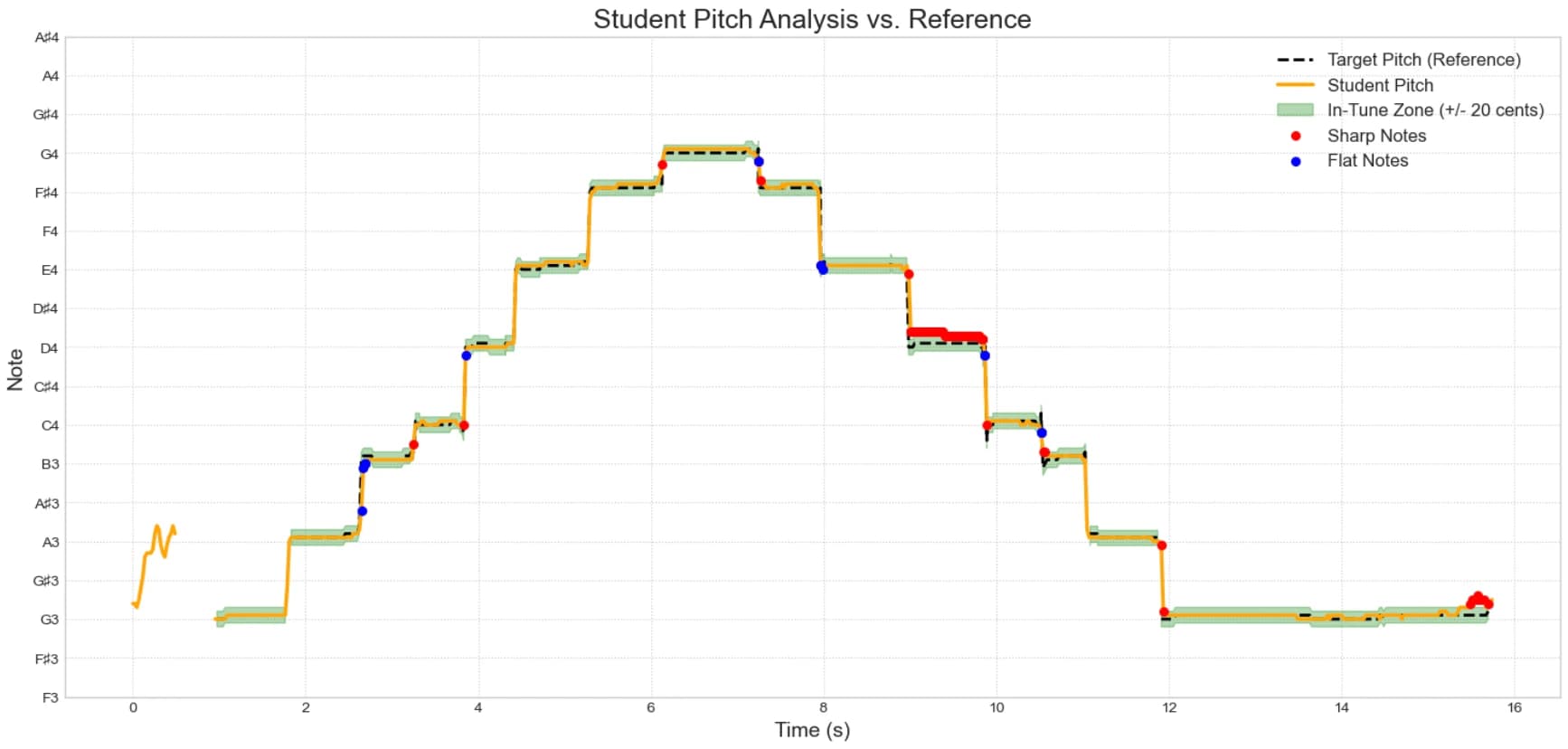
This graph is the "Aha!" moment. In one picture, I can see exactly which notes were on point and which ones need a little more practice. It’s no longer a vague "that note sounded a bit off," but a concrete "your B was consistently sharp."
Step 7: Creating a Practice List
To make this even more useful, we can automatically generate a text-based list
of feedback. By detecting the start of each note (onsets), we can analyze the
intonation for each note individually.
# Detect note onsets in the student's audio
onsets_student_frames = librosa.onset.onset_detect(y=y_student, sr=sr_student, units='frames')
onsets_student_times = librosa.frames_to_time(onsets_student_frames, sr=sr_student)

print(f"Detected {len(onsets_student_times)} notes in the student's performance.\n")
print("--- Detailed Feedback ---")

# Analyse each note segment
for i in range(len(onsets_student_times)):
  start_time = onsets_student_times[i]
  end_time = onsets_student_times[i+1] if i < len(onsets_student_times) - 1 else aligned_times[-1]

  # Find the corresponding section in our aligned data
  note_indices = np.where((aligned_times >= start_time) & (aligned_times < end_time))

  # --- Filter out NaN values from the segment ---
  note_segment_midi = midi_ref_aligned[note_indices]
  valid_midi_in_segment = note_segment_midi[np.isfinite(note_segment_midi)]

  # --- Only proceed if the segment contains actual notes ---
  if valid_midi_in_segment.size > 0:
    # Now, perform calculations ONLY on the valid (non-NaN) data
    note_segment_cents = cents_deviation[note_indices]
    valid_cents_in_segment = note_segment_cents[np.isfinite(note_segment_cents)]

    # Calculate the average deviation for this note
    avg_deviation = np.mean(valid_cents_in_segment)

    # Use the median of the valid MIDI notes to identify the target note
    target_note_midi = np.median(valid_midi_in_segment)
    target_note_name = librosa.midi_to_note(target_note_midi)

    feedback = f"Note {i+1} ({target_note_name}) starting at {start_time:.2f}s: "

    if avg_deviation > in_tune_tolerance:
      feedback += f"SHARP by an average of {avg_deviation:.1f} cents. Focus on lowering the pitch."
    elif avg_deviation < -in_tune_tolerance:
      feedback += f"FLAT by an average of {-avg_deviation:.1f} cents. Focus on raising the pitch."
    else:
      feedback += "Good intonation."

    print(feedback)
# Sample Output:
Detected 24 notes in the student's performance.

--- Detailed Feedback ---
Note 1 (G3) starting at 1.02s: Good intonation.
Note 2 (G3) starting at 1.76s: SHARP by an average of 14218.1 cents. Focus on lowering the pitch.
Note 3 (A3) starting at 1.86s: Good intonation.
Note 4 (B3) starting at 2.62s: Good intonation.
Note 5 (C4) starting at 3.30s: Good intonation.
Note 6 (D4) starting at 3.83s: Good intonation.
Note 7 (D4) starting at 3.95s: Good intonation.
Note 8 (E4) starting at 4.41s: Good intonation.
Note 9 (F♯4) starting at 5.27s: Good intonation.
Note 10 (G4) starting at 6.13s: Good intonation.
Note 11 (G4) starting at 6.20s: Good intonation.
Note 12 (F♯4) starting at 7.24s: Good intonation.
Note 13 (E4) starting at 7.96s: Good intonation.
Note 14 (E4) starting at 8.54s: Good intonation.
Note 15 (E4) starting at 8.89s: SHARP by an average of 35.7 cents. Focus on lowering the pitch.
Note 16 (D4) starting at 9.06s: SHARP by an average of 21.7 cents. Focus on lowering the pitch.
Note 17 (C4) starting at 9.89s: Good intonation.
Note 18 (C4) starting at 9.94s: Good intonation.
Note 19 (B3) starting at 10.54s: SHARP by an average of 26.7 cents. Focus on lowering the pitch.
Note 20 (B3) starting at 10.61s: Good intonation.
Note 21 (A3) starting at 11.05s: SHARP by an average of 8316.4 cents. Focus on lowering the pitch.
Note 22 (A3) starting at 11.12s: Good intonation.
Note 23 (G3) starting at 11.89s: SHARP by an average of 11155.2 cents. Focus on lowering the pitch.
And there we have it, a clear, data-driven practice list generated from a simple audio recording.
Conclusion and What’s Next
This has been a huge step forward in my journey. We've gone from a soundwave to a visual analysis and a concrete list of suggestions. This is no longer about my subjective hearing; it's about objective data that my daughter and I can use to target her practice sessions more effectively.
Of course, this is just the beginning. Intonation is only one piece of the musical puzzle. In Part 3, I’ll explore the limitations of this approach and discuss how we can expand it to analyse other crucial aspects of musical performance, like rhythm, timing, and dynamics. Stay tuned!
References & Further Reading
This article builds on the incredible work of the open-source and academic communities. For those interested in diving deeper, here are the key papers and resources I used.
librosa: Audio and music signal analysis in python
McFee, B., et al. (2015).
This is the official paper for the
librosalibrary, the core tool we used for all audio processing.pYIN: A fundamental frequency estimator using probabilistic thresholding
Mauch, M., & Dixon, S. (2014).
This paper introduces the
pyinalgorithm for pitch estimation, which we used to extract the pitch contours.Dynamic programming algorithm optimization for spoken word recognition
Sakoe, H., & Chiba, S. (1978).
The foundational paper on Dynamic Time Warping (DTW), the algorithm we used for aligning the two performances.
Calculation of a constant Q spectral transform
Brown, J. C. (1991).
This is the research behind the Constant-Q Transform (CQT), the musical-friendly analysis method
librosauses to create chromagrams.